Monday, June 13, 2011

Group Leadership Project: Part B - Storyboard and Script

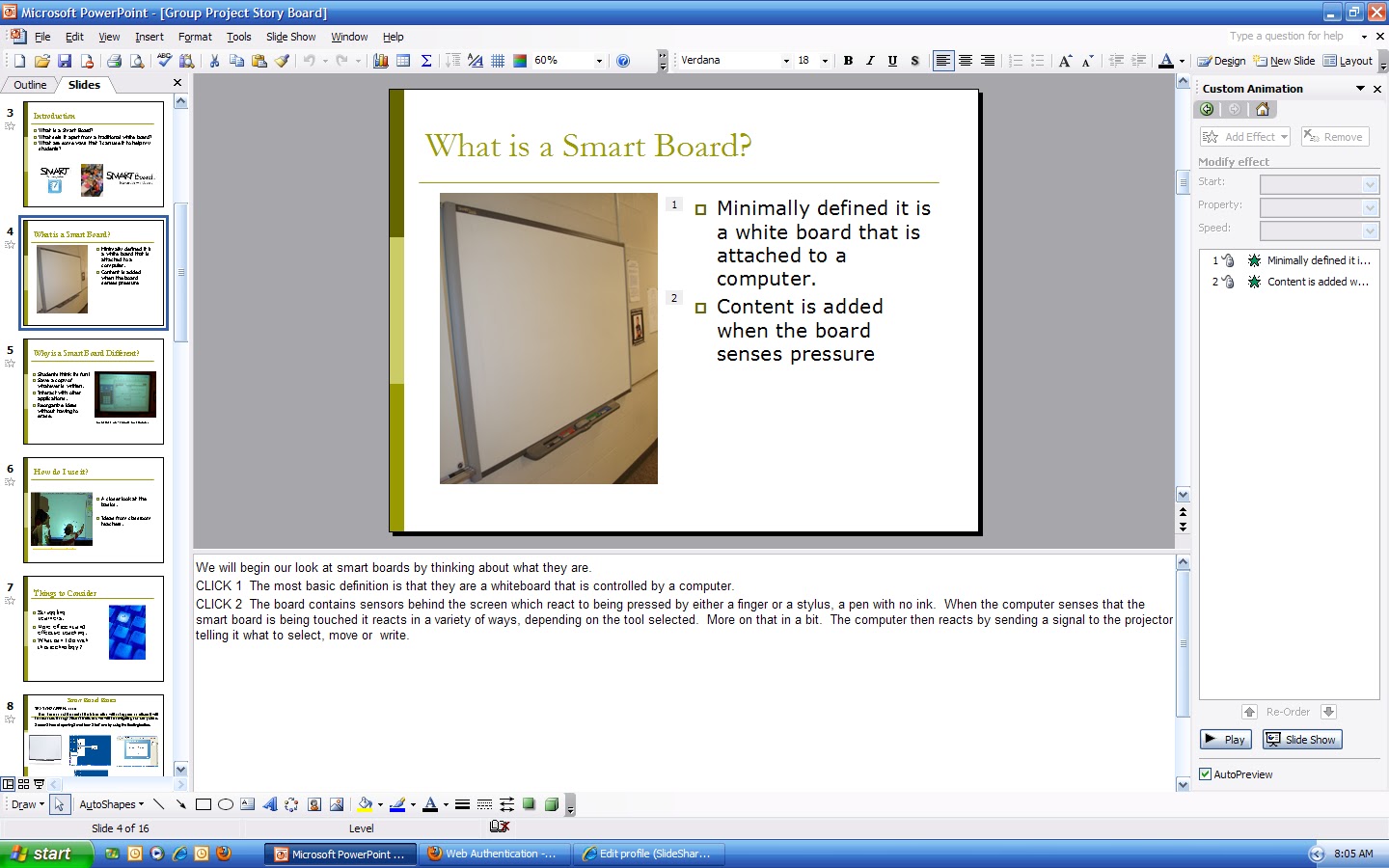
This is our storyboard for our group leadership project.  This is a newer version than what my group members posted, which is entirely my fault as I was late in making my edits to the introduction.  Please do not hold them responsible!  The scripting is mostly contained in the comments section which is not readily viewable using Slideshare.  I included some screenshots later on to show what the actual script looks like.

Reflections so far on what we have accomplished.  We did not spend nearly enough time discussing how this portion of the project would be carried out.  All we had decided on was that we would use PowerPoint.  I am definitely regretting that decision.  Since that time we have had several issues.  The first issue we have is that PowerPoint can not be worked on simultaneously like Google Doc file can.  The result is that I received a .ppt file from a group member with a slide that said this is where your portion goes.  I viewed the presentation using Google Docs as Gmail gives this as an option.  It looked like an acceptable presentation that was well thought out and nicely laid out.  When I asked where the script portion was (via chat) I was told that it was in the notes section, which I am unsure if Google even supports.  When I opened the document using PowerPoint I was unsure where to look still but I eventually found the area where the existing script was (to be honest I don't think I knew that area existed before that point).  In retrospect, all of this could have been avoided had we scheduled a time to all get together and work, at least for a while, so we could make some decisions on the formatting as a group instead of doing our parts individually and then trying to put it all together.  It was not disastrous just inconvenient and inefficient.


I also encountered an issue when I received the PowerPoint back from my group with all the sections put together.  My group members had suggested some changes to my portion; however, when I went to edit the file I found that all of my bullet points were showing up as images instead of editable text fields.  I am guessing that this is due to a version compatibility issue as my group members are working with a post 2003 version of Office and alas, I am still in the dark ages.  :(  I ended up having to redo entire slides which wasn't entirely a bad thing since I had lots of edits that needed to be made.  In my opinion, this is where cloud computing excels.  We would have had no issues (well at least not the same ones) had we chosen Google Docs as it is the same for all users regardless.  We couldn't necessarily have foreseen all of these issues and I do not mean for this to be a criticism of my group members, rather it is a reflection on some of the issues that I have encountered so far and the lessons I have taken from them.

Looking at our storyboard as it stands now, we will have several things to do before it is ready to go into final production.  We need to remove all of the scripting from the actual slides.  I have volunteered to tackle this portion but I am waiting to hear back from my group about how we will proceed.  I think we also need to compile a document of some sort that puts all of script items (what will be said, when to transition...) in one location so that when it is time to produce the final product it can be more easily accomplished.  Last we will need to actually produce the final presentation.

Sunday, June 12, 2011

Group Leadership Project: Part A - Brainstorm

Having agreed upon an original time to meet our group met at first using an online meeting tool that Lisa selected, I believe from the list that was provided in the Lab.  We found almost immediately that we were having problems getting set up and logged-on to.  Lisa picked a different meeting tool, Vyew, and we moved the meeting to that site.  Once we ironed out some technology problems, feedback, and getting everyone talking so we could hear we began our brainstorming meeting.  I captured what you see below using Jing and quickly discovered that it only picked up my voice, though you can faintly hear the others talking.  This is what the meeting looked like once we got going.  Please excuse the creepy breathing sounds.  :)

Unable to display content. Adobe Flash is required.

Things moved pretty quickly once we were up and running.  We chose to focus on Smart Boards as our presentation topic as we all have one in our classroom.  At first, and to some extent now, I  am not thrilled with the choice.  I do not think Smart Boards are particularly great tools as they don't integrate very well into my students centered teaching style.  I agreed to the topic in the hope that I would be able to learn more about what others were doing with them and why they felt that they were so great.  We talked very briefly about just that, what my other group members were doing with theirs.  They threw out ideas "whats that thing you do? A vortex?"  and I asked some clarifying questions to try to get a better idea about what they were talking about.  (Note, I am the only one form my group that does not teach in the same school.)  The summary of their ides sounded good and I left with the impression that we would have a good amount of interesting material to discuss and I felt certain I would learn some new things that I could use in my own classroom.  We then went on to discuss who would be doing what portion of the project.

We settled on using a PowerPoint in conjunction with Slideshare to make our presentation.  It was decided that I would tackle the intro.  Lisa would deal with some of the basics of the Smart Board, and Jenna and Laura would each put together a piece on what they were doing that was unique in their classrooms.  I don't recall the exact timeline at this point, but as I recall it was about 4-5 days out.  We made no plans at that time for a specific date to reconvene.

As I mentioned earlier we used the Vyew site to host our conference.  It was easy to get to the meeting and once we got all of our equipment working together, the meeting went well enough.  We didn't spend a lot of time playing with all of the features of the site as we were already pressed for time having spent 30 minutes trying to get it all working.  I did go back into an empty room (part of their preview of the site) later to play around with some of the tools.  The equation editor was a neat feature that I discovered during this second pass, and it is of particular interest to me as conveying math in symbols is often not well integrated into the web based technologies I have used previously.  We did as a group make use of the desktop sharing feature while looking at the requirements for this project.  Other big advantages, it worked, which was better than where we started.  The biggest disadvantage was that it did not allow us to record the session.  (My group scheduled a make-up session (which I missed) with Adobe Connect and it seems as though they didn't mange to get that feature to work with it either.  The second disadvantage was the amount of time taken from our meeting by dealing with getting everyone connected and able to hear and see each other.  We would have probably been able to brainstorm far more quickly had we just used chat feature of Google Docs and made notes in the document..  This is what I have done for the two previous group projects I have worked on and it has performed more than effectively.

I am sure that having gone through this once it would be far easier to use in the future.  It is defiantly not a tool I would use again knowing that I was pressed for time, or if it were the first time that a majority of participants would be using it.  Could not even begin to imagine what this would have been like if it were three teenagers and a teacher trying to get this set up.  :)

Wednesday, June 1, 2011

Video Conferencing Lab


The conference did not go well at all.  We ran into problems with people being unable to be heard or seen with the first attempt.  We moved the conference to the Vyew website which was much more useful.  However we quickly ran into problems with feedback.  I posted my tip to MACUL about how to deal with this problem.  One member of our group was able to share her screen which was on the Angel sight so we could all be looking at the description of the assignment we were working on.  We ran into another problem when we found that we could not record our conversation using the tools offered.  I made an attempt to record it using Jing, but what I ended up with is a view of my screen, my creepy breathing through the microphone and no one else’s voice.  Of course this was compounded by the fact that I was trying to feed my daughter at the same time.  It is hard to troubleshoot a tech problem when you have limited use of one hand.  :)  

Having used Vyew and worked out some of the bugs I am sure that it would be much easier to use for subsequent meetings.  I also spent some time just plying n an empty room.  It has an equation editor built in which was of interest to me as it is often difficult to communicate math symbols and equations with a linear display. 

With regard to class use implications, I can see how it would be useful if there was no other method for seeing or hearing students, such as it is used in this class.  I could also see using it with homebound students, especially since my class relies so heavily on discourse to make sense of the material.  However, I also sense that it requires a huge time commitment outside of the classroom and as awful as it sounds to say this, I am at the limit of what I can do right now outside of “working hours”.

I am much more comfortable communicating via text or email as I have easy access to a record of what was said and when it was communicated.  I know that part of this course is stretching us beyond our comfort zone and I appreciate the exposure to something new.

Tuesday, May 31, 2011

Wicked Problem Project: Part B - Application of TPACK


What is the TP knowledge for the solution?  (i.e., how does the technology you have chosen support the teaching strategies and methods you have chosen?)

The Wicked problem I have chose has a somewhat unorthodox pedagogy associated with it.  The content will not be delivered by a classroom teacher but instead will be delivered by two interventionist who will be pulling students throughout the day from classes other than the students’ primary math classes.  As such, the solution must allow students to enter and leave the intervention at any point.  The goal of the intervention is to increase achievement in a student’s current math course.  Another layer of complexity is attributed to the fact that we do not use textbooks in out Algebra 1 and Algebra 2 courses.  Instead we have a series of assignments that are meant to allow students to build their own knowledge of mathematics rather than having a book or a teacher as the authority.  When students take charge of their own learning and are the ones who control the direction of their learning they achieve more than those who simply memorize a series of facts that to them are discrete and disconnected.  We find that many students struggle in transitioning from having math content dictated to them to being responsible for generating their own ideas about it.  As a result they do not engage in conversations about mathematics in the classroom and wait for others to do most of the thinking. 
The technology that I choose to address these issues is a website that contains learning modules.  There are several reasons that make this technology a good fit for the pedagogy.  First, it allows students to access material throughout the day and allows them to access to material after school hours as well.  This is important to our pedagogy in the sense that students can be pulled from another class to work with us on issues that the classroom teacher deems necessary.  The intervention is allowed to take place for as long as necessary in order to help the student achieve.  More importantly we can put them in apposition where they are responsible for building their knowledge.
Central to the TP portion of this discussion is that a website allows us to produce, store and display content that matches the way we teach.  Currently our district is spending large sums of money for a software package that claims to be aligned with the Michigan High School Content Expectations, which is disputable.  What is not in dispute is the fact that it is not aligned with the way we teach, and therefore only reinforces the students beliefs that mathematics is something that is to be memorized and not engaged in.  The software seemingly asks students to memorize rote facts and recall them later.  It contains assessments that are multiple choice and really allow the students to guess their way through the material.  While there are times when we need students to know and use algorithms, we usually ask students to derive them.  When assistance such as the one provided by our districts software are used we send students the message that what we really value is their ability to memorize an algorithm.  When students return to their classrooms they take the idea with them and the cycle repeats itself.  Creating our own website allows us to have complete control of the material we use and allows us to be sure that it matches our pedagogy. 
It is difficult to separate the content from this part of the discussion but part of the content that is planned for the website is directly related to the TP part of the discussion.  Overwhelmingly teachers responded to a survey that I sent out to them by saying that one of the biggest obstacles that they see for their students is lack of engagement in the curriculum.   One module will be devoted to student learning habits in an attempt to help them understand what is required to be successful in their math class.

What is the TC knowledge for the solution? (i.e., how specifically does this technology make the content in your problem more intellectually accessible?  Be sure to think about representation.)

It is difficult to separate the content from the TP part of the discussion because I see the content and pedagogy are so tightly intertwined in my mind.  The planned content for the website is directly related to the TP part of the discussion.  Overwhelmingly teachers responded to a survey that I sent out to them by saying that one of the biggest obstacles that they see for their students is lack of engagement in the curriculum.   One module will be devoted to student learning habits in an attempt to help them understand what is required to be successful in their math class.
Since the content related to the Wicked Problem is the entire Algebra 1 and Algebra 2 curriculum it is difficult to discuss specifically why the chosen technology is a good match to a specific area.  What is true about the chosen tech is that it allows for multiple other technologies to be used within it.  Instead of discussing the entirety of the problem we can look at how a module may play out.  The results of the survey I sent out also indicated that students have difficulty transferring between the representations of a function (Table, Graph, Rule and Verbal-Written).  A part of the module devoted to exploring these ideas might be a time lapse video where students are asked to record their ideas about what things the can measure that are changing.  They could also be asked to think about way to show how two of the things that noticed change.  More pointed questions like pick two things that are changing and make a table are also possible.   This same module may contain more directly targeted ideas like a StAIR where the students would be asked to take a table, make a graph from it and explain how the two relate.  Each module would also have an assessment at the end to give us and the student feedback about their progress.  A Google Docs Form could be embedded for this purpose.  A link to a Jing presentation about how to make a rule from a table could also be included.  The list above is my brainstorming about how the particular content we are interested in is connected to the technology.  The format of a website allows for complete flexibility to add many different types of experiences for the student to help them engage in the content more fluently.  While the idea of student learning styles is not the only way that students can learn the website also provides for an array of learning styles to be addressed.

What is the PC knowledge for the solution? (i.e., how specifically do your pedagogical choices make the content in your problem more intellectually accessible?) Be sure to think about how the student will experience the content given these instructional strategies.

I touched on this idea in the both previous sections.  Where our program differs most significantly from my perception of other mathematics programs is that we do not teach a skill and teach how it is connected to other ideas.  Our goal is to have students come up with ideas for how to deal with problems that is directly linked to other things that they already know.  They may then develop skills as a result of a deeper understanding of the mathematics, but it is meant to be grounded in understanding, not memorization.  We often provide situations where we expect particular mathematics to be “discovered” as a result but the questions are open and not scaffolded to the point where students are left with no other choice but to do the things we want.  This kind of thinking by students is uncomfortable for many of them and they struggle as a result.  There is a need for students to have extra practice in thinking through this type of problem, as this is what is expected of all students in the classroom.  For some students the extra chance to experience the content from their classes again may aid in their understanding and proficiency. 
We also know that having multiple means to access content is helpful in allowing students to access the mathematics.  Many students may also find that interacting with a computer allows them to move at their own pace through material as opposed to what they may experience in the classroom.  Many students lack self assessment skills which would be a tenant in any of the content that is presented in the modules.   It is hoped that students will be able to see some success with mathematics in an environment that is nonthreatening and not directly tied to a grade.  They can experiment with their ideas and build new ones without having to feel as though others will judge them for their responses.  This is where I take on a very active role with students, encouraging them to work with the content the way they would be expected to in their actual math class.

Monday, May 23, 2011

PART A - Description of Need or Opportunity (Wicked Problem Project)


It is fair to say that the Holt High School mathematics department prides ourselves on using what we consider to be many of the latest technologies.  When I started the certificate sequence I was surprised to learn about just how few technologies we really do employ.  Our administrators are pushing us to continue to employ technologies as they learn of them.  An unfortunate side effect of this push is that we are using some technologies that seem good on paper, particularly the publisher’s marketing documents, and when we are asked to use them we quickly find that they are far from perfect, or even worse a hindrance to student learning.  Many focus on learning rote facts and procedures with little meaning attached.  That is what makes this project so important to me.  It was determined that next year I will be teaching a regular classroom part time and using the remainder of my time to work with struggling mathematics students in an “interventionist” role.  The requirements that were laid out for our department were that whatever program was created was to employ a blended (computer and in person) instruction model.  This represents the first time that the classroom teachers will be responsible for designing a course that must integrate technology.  So we stand at the edge of a very pressing problem (one might call it a wicked problem), the need to design a series of interventions that make regular use of technology.
The problem more narrowly defined is that the number of students who are failing our Algebra 1 course is too high.  Credit recovery courses that have been offered seem to only exacerbate the problem by allowing kids to feel that if they fail the course that they will be given multiple opportunities to retake it.   This leads to students simply giving up when it get the least bit hard.  Unfortunately the summer school and credit recovery courses that we offer are so watered down that we find students often fail the next class in the sequence and find themselves back in credit recovery.   We need to devise a way to keep kids on track for graduation and avoid having it become a lower track which is inescapable.  Enter the interventionist position.  My task is to identify struggling learners in a class and work with them to help them be successful in the class that they are currently enrolled in thereby allowing them to find and maintain success in the normal curriculum.  The current plan calls for students to be drawn form the entire population of Algebra 1 at high school, so the interventions need to be flexible enough to allow any student to enter and exit as needed.  This is considered a part (Tier 2) of the Response to Intervention (RtI) model which is currently being implemented through the Ingham ISD. 
            As it stands we have decided to make a series of modules to address issues common to our struggling students.  The goal of each module would be to give students multiple ways to access the material.  We have looked at various course management systems (CMS’s) as a means to deliver these modules but have been met with various obstacles.  Most of the CMS’s do not seem to allow for a easily viewable, accessible layout that is easy to jump in and out of.  This is particularly important because we do not want to have to “enroll” students in CMS course when the intent is to have them move in and out of our supervision.  I think that the most useful way to go is to make a website that is always accessible.  The idea would be to have the learning modules up on the site so that when we work with a student we are able to send them to the computer right away to work on a particular module that meets their needs.  Like the CMS’s a website also allows students to access needed materials outside of the class both during the school day and at home if they choose.  Another benefit of a website is that it is possible to add any type of material that is required.  There is no company that restricts what type of java app can be used with their software or on their servers.
            The proposed solution is to create a website and add modules as need be.  We would also continue to edit existing modules as needed.  There are issues to consider with regard to building a website, in that it requires someone with the ability to build it in order to maintain and alter it.  Each module is likely to contain other technologies within it such as blogs, StAIR’s, webquests and web 2.0 technologies.  A likely goal for the portion that will be completed during CEP 812 will be to set up the website and add one module complete module or portions of a few modules to it as completing the entire site in the time allotted for this course would be infeasible. 

Friday, May 6, 2011

CEP811 Reflection

I'm not entirely sure what I am supposed to have taken away from this class as far as integrating technology goes.  I guess UDL is a combination of accessibility combined with generally just being a thoughtful teacher.  I am not using the word thoughtful in the caring sense, but rather in the contemplative "I need to make sure I am aware of all the aspects of this before I put this in front of kids" way.  It seems to me that this is common sense what good teachers should be doing.  I'm a little disappointed that some people need a checklist to be thoughtful about teaching, regardless of the content.  I suppose that because I don't use a textbook I might be more aware of these ideas whenever I design any content that I will put in front of my students.  I was also taught to write unit plans using Wiggins and McTighe's UbD. 

The StAIR project was by far the most useful thing that I created in this class.  It isn't so much the StAIR that I created as much as it is the ideas of what I can do with it.  I am particularly drawn to the idea that I can tailor an experience for the students at my school and be responsive to their needs and the way we each Algebra, not beholden to some textbooks CD interpretation of Algebra that they supply as a "resource".  I actually took mine to a cross departmental meeting and asked teachers from other departments to try it.  I explained that I thought it would be a good idea for everyone to know how we are teaching our students to solve equations.  I also started thinking about using  it as a resources for parents, as we get a lot of complaints about not having ways for parents to access the material.  Maybe I will post some things like it on my website.  Next year I am teaching an intervention class and was thinking how nice it might be to have a fleet of StAIR type things that kids can sit and work on that are actually in line with the curriculum we teach (as opposed to the garbage E2020 software our district has now).  I am amazed by how many things that just this one assignment or other things like it could be useful for.  This project has given me lots to think about as far as goals for integrating technology into my department.

Just an aside but doing the StAIR project made me remember playing with HyperCard on a Mac when I was in Jr. High.  We used to write goofy games that were navigated in exactly the same way.

I liked making the website as well and I spent a lot of time hand coding it.  I have learned a ton of HTML #tags and a lot about what goes into trying to make a site that displays well in multiple browsers (might want to look at my site with Firefox because it doesn't play nicely with IE).  I mentioned that I would like to create a website for my department and I feel like that is much more realistic at this point.  I will probably scrap much of the code I wrote for my site and try again.  It is really sloppy and I am having tons of issues with the named CSS elements not playing nice with the CSS rules.  I am in no way disappointed by the idea that a lot of hard work may be scrapped because I am sure of the fact that I will learn a ton more and be able to create a site that is even better.  This is the piece of the class that has brought me much nearer to my personal goals at least as they stood at the beginning of the class.

I've come to look at my goals for this program as being very flexible.   They have changed drastically in the short time that I have been enrolled in the MAET program and I see that they will probably continue to evolve as I am faced with new information in each course. 

I am not a big fan of having to read about and respond to issues of pedagogy where the questions regarding it presume that I learned so much from it.  I felt like that happened a lot in this course.  Read this amazing thing that should "change the way you teach" and now tell us how great we are for having put it in front of you.  I appreciate it when an idea is delivered without having made mention of exactly what conclusion I was supposed to draw.  It is more authentic feeling to me, as I am not a person who likes the feeling of having someone tell me what to think.